Pilot Thanksgiving · reunions · birthdays · cookouts

Plan together. Bring what’s needed. Keep the memories.

Get the whole family together, without the group-text chaos.

The family group text, the spreadsheet, and the sign-up sheet—in one private place. Households RSVP in one tap, sign up to bring what’s needed, and share photos after.

  • Free for guests
  • No ads or trackers
  • Free during the pilot
The host’s dashboard for “Sample Thanksgiving” on a computer: date, time and farmhouse location, buttons to invite households and share an update, tabs for guests and RSVPs, agenda, bring list, tasks, messages, photos, stay and vendors, and a countdown showing 20 days to go.
A guest’s invitation on a phone: “You’re invited — Sample Thanksgiving, for the Hazelnut Household, 21 days to go,” with when, where, who’s hosting, the reply-by date, and buttons to add it to a calendar or open the address in Maps.
The host’s dashboard and a guest’s invitation. Screens from the sample gathering — made-up families and data.
  • Private by default
  • No app for guests
  • AI that only proposes
  • Private photo albums
  • Export your data

For your guests

For your guests, it’s one tap

Grandma doesn’t need to download anything. She opens her household’s link, taps who’s coming, and she’s on the list.

  • Each household gets its own private link. It opens in any phone’s web browser.
  • No app to install, no account to create, no password to remember.
  • Answer for the whole household at once, adults and children, and change it anytime.
  • Add it to your calendar, open the address in Maps, and see what still needs bringing.
A guest’s invitation on a phone: “You’re invited — Sample Thanksgiving, for the Hazelnut Household, 21 days to go,” with when, where, who’s hosting, the reply-by date, and buttons to add it to a calendar or open the address in Maps.
1. The invitation
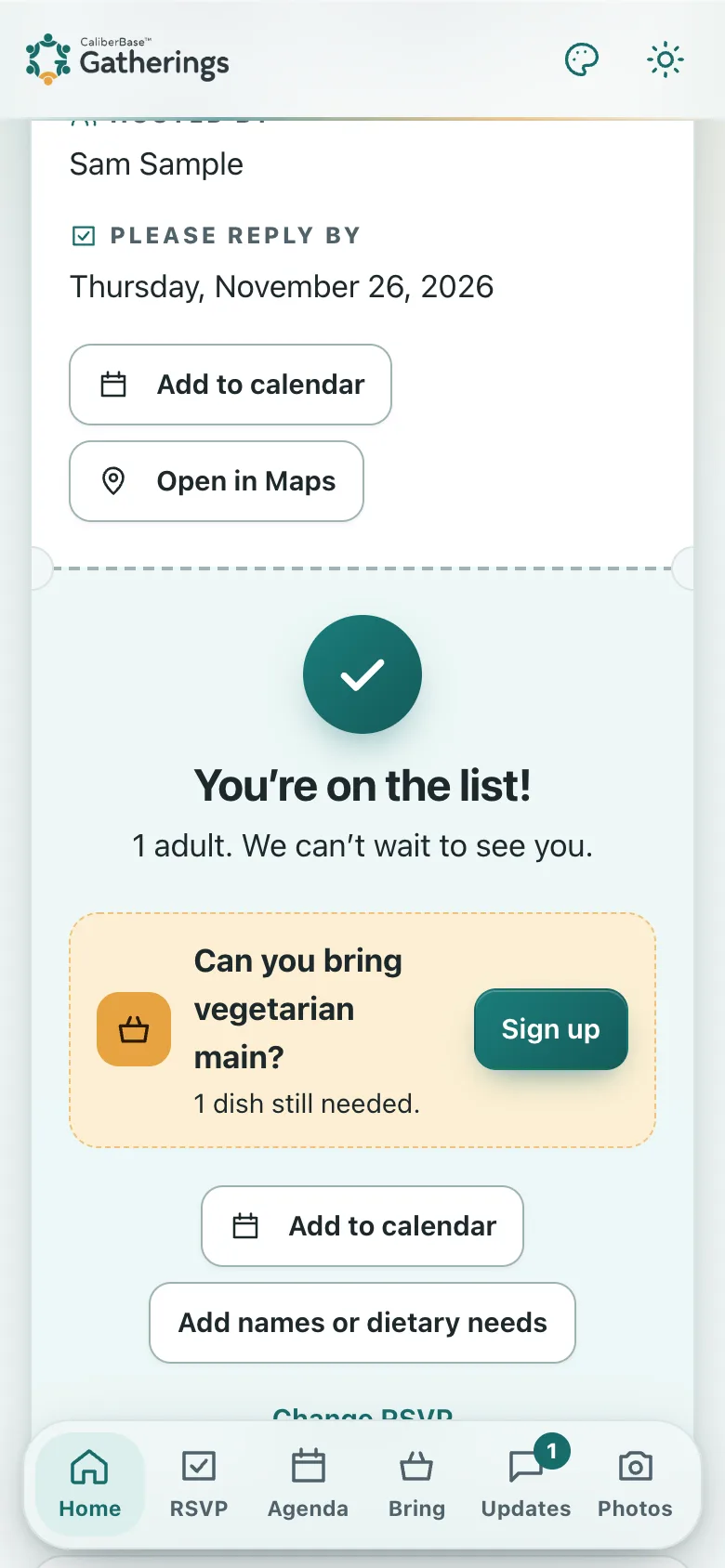
After a one-tap RSVP on a phone: a check mark and “You’re on the list! 1 adult. We can’t wait to see you,” followed by a prompt asking “Can you bring vegetarian main? 1 dish still needed” with a Sign up button.
2. After one tap

Screens from the sample gathering — made-up families and data.

For the host

Less group text. More gathering.

Everything the host, the helpers, and the guests need, without a spreadsheet or a 200-message thread.

Bring list

Nobody brings the fourth potato salad

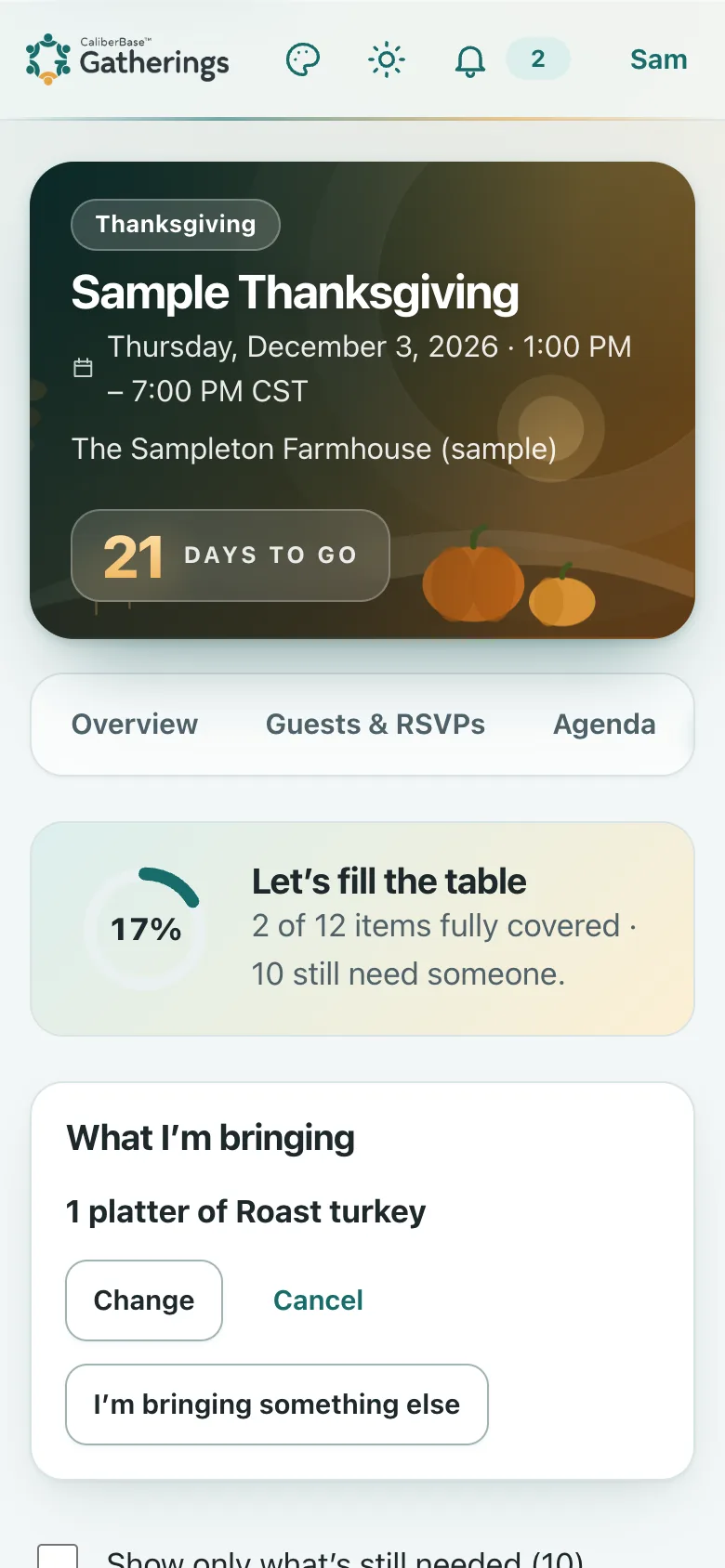
Households sign up for what they’ll bring, with quantities—“2 pies,” “a bag of ice,” “6 folding chairs.” One list shows what’s covered and what still needs someone.

  • See at a glance how full the table is
  • Filter to only what’s still needed
  • Print it for the fridge door
The bring list on a phone: “Let’s fill the table, 17%: 2 of 12 items fully covered, 10 still need someone,” then “What I’m bringing: 1 platter of roast turkey” with Change and Cancel, and a filter to show only what’s still needed.
The bring list, with what’s covered and what’s still open.

Schedule

Everyone knows when dinner is

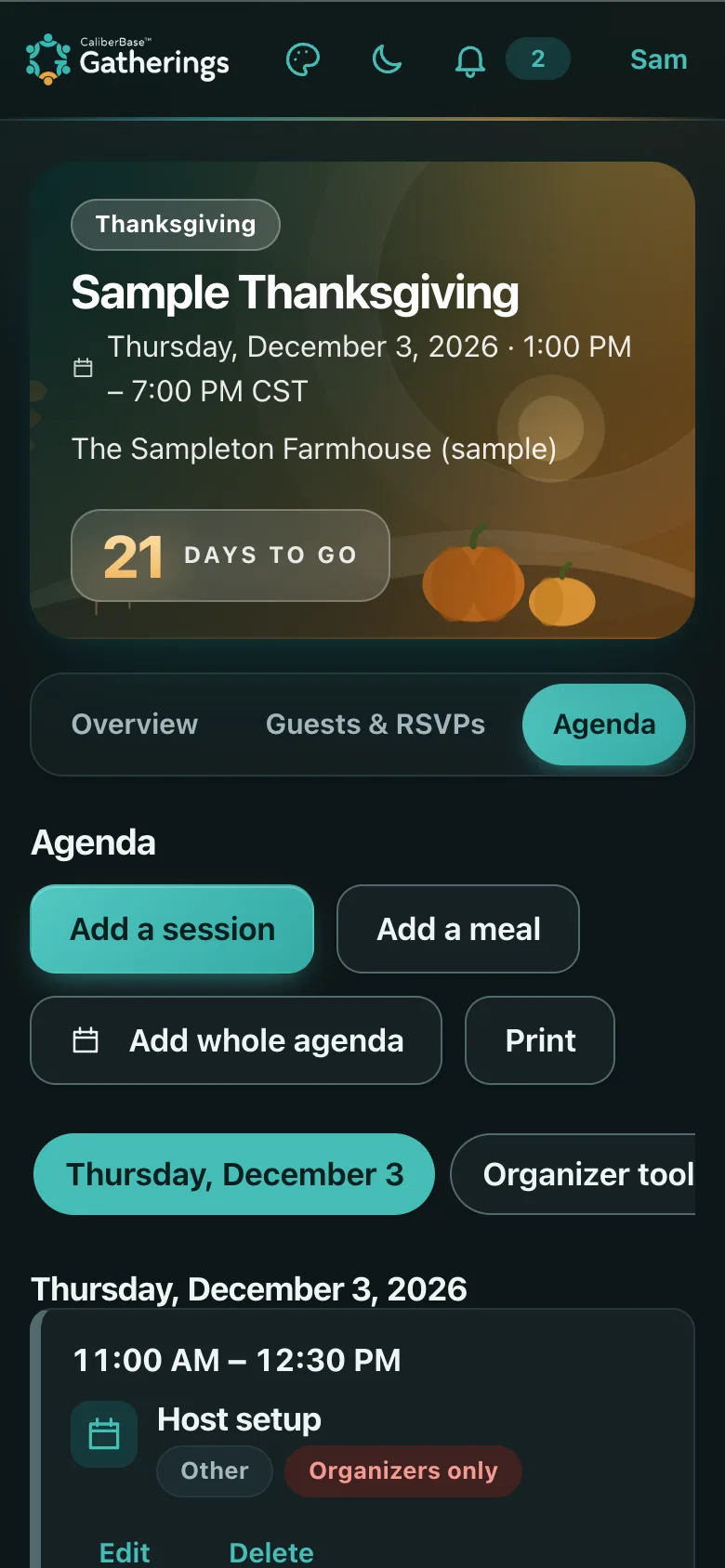
Lay out the day—or the whole weekend—with sessions and meals. Guests add the agenda to their own calendar, and setup jobs can stay visible to organizers only.

  • Sessions and meals, day by day
  • Add the whole agenda to a calendar
  • Print a copy for the kitchen
The agenda on a phone in dark mode: buttons to add a session, add a meal, add the whole agenda to a calendar, and print, then Thursday’s schedule starting with host setup from 11:00 AM to 12:30 PM, marked organizers only.
The agenda, shown in dark mode.

Stay & vendors

Hotels and helpers, all in one place

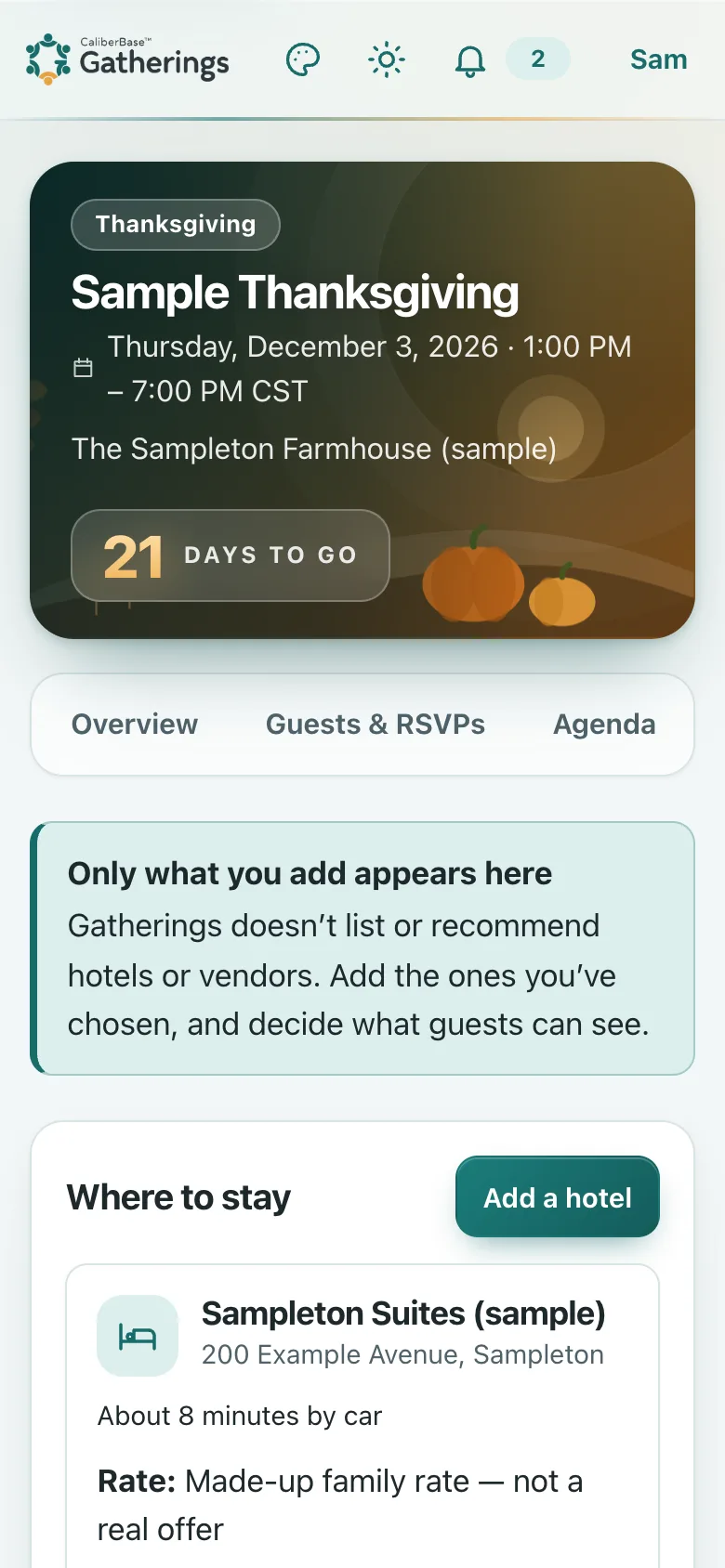
Coming from out of town? Add the hotels you’ve picked, with the group rate and any discount code, plus the caterer, DJ, photographer, or rentals you’ve booked. You decide what guests can see.

  • Hotels with distance, rates, and discount codes
  • Vendors you’ve chosen, kept with the plan
  • Nothing listed or recommended unless you add it
The Stay and vendors page on a phone: a note that only what organizers add appears here, and a “Where to stay” list with a sample hotel, its address, about 8 minutes by car, and a made-up family rate.
Where to stay, as an organizer adds it.

And everything else a gathering needs

  • A calm dashboard

    Missing RSVPs, unclaimed dishes, and open tasks in one place. Share the work with co-organizers.

  • Tasks

    Hand out jobs like “pick up the folding tables,” and check them off.

  • Announcements

    Post a new start time right where everyone checks the plan.

  • A private photo album

    Gather everyone’s pictures after, in an album that stays with your family.

  • Planning meetings

    Add the Zoom, Teams, or Meet link you already use.

  • A planning assistant that only proposes

    It drafts menus and to-do lists. Organizers approve every change.

Screens from the sample gathering — made-up families and data.

Why switch

Everything the group text forgets

How the usual tools stack up for a family gathering.

Comparing Gatherings with a group text, a spreadsheet, and a sign-up sheet
GatheringsGroup textSpreadsheetSign-up sheet
Household RSVPs with headcountsYesBuried in repliesIf someone keeps it updatedNot really
What’s still needed, with quantitiesYesScroll and hopeBy handOften
Private photo albumYesMixed into the chatNoNo
Guests need no accountYesYesOften needed to editVaries
Works on any phoneYesMostlyHard on a small screenVaries
Schedule, hotels, and to-dos in one placeYesNoWith extra tabsNo

Questions

Good questions, straight answers

Is it free?

Guests are always free—they never pay and never enter payment information. Organizers use Gatherings free during the pilot. We’re testing organizer plans for later, and we’re upfront about the price ranges. See pilot pricing.

Do guests need an app or an account?

No. Each household gets its own private link that opens in any phone’s web browser. There’s nothing to install, no account to create, and no password to remember.

Who can see our photos?

Only the people in your gathering. Albums are shared with your group—not posted publicly or listed in search engines. We strip location data, like GPS coordinates, from photos when they’re shared, and we never send photos to the AI provider.

Does the AI do things on its own?

No. The planning assistant only proposes—drafts of plans, menus, and to-do lists. An organizer reviews and approves every change. It never sends messages or signs anyone up, and it never promises that a menu is allergy-safe.

Can I use it for more than Thanksgiving?

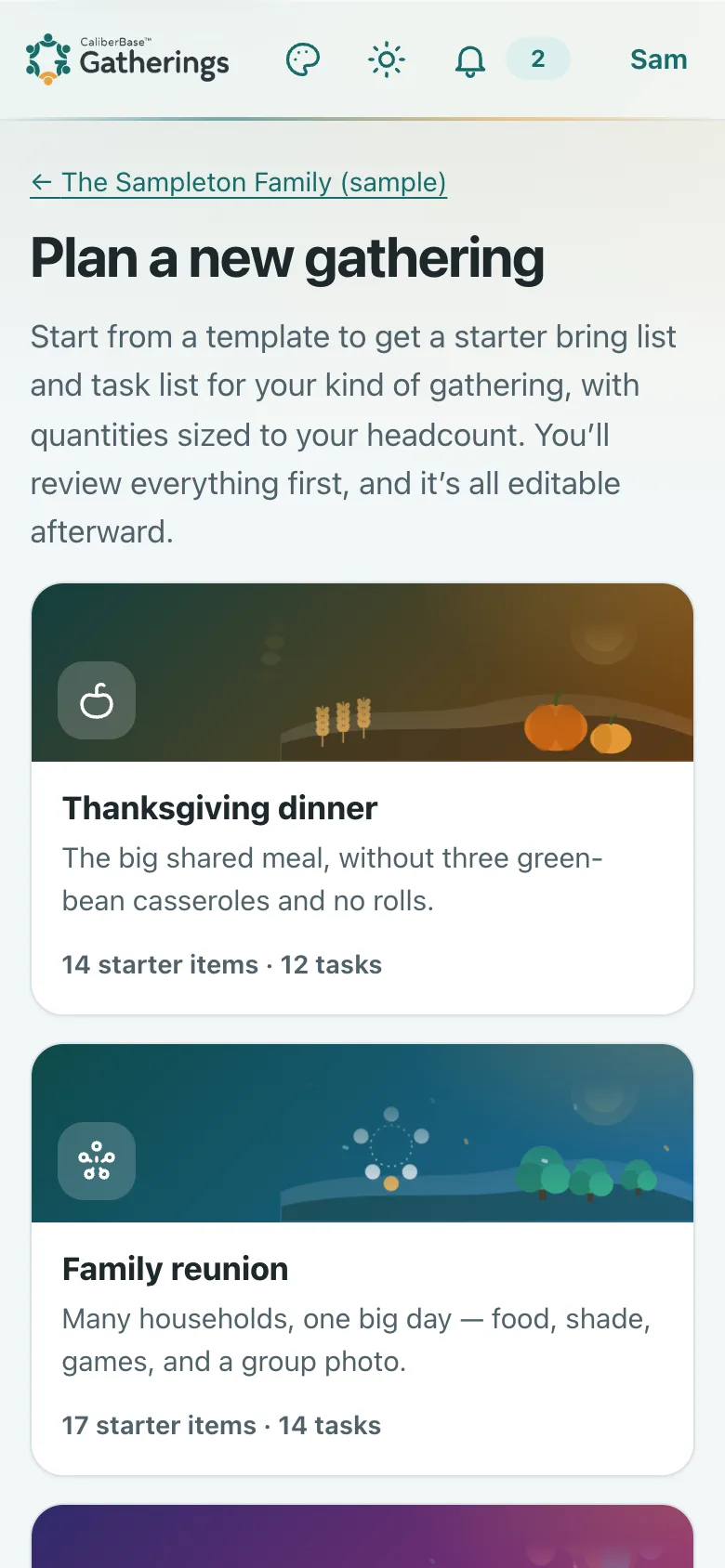
Yes. There are starter templates for Thanksgiving dinner, family reunion, birthday party, cookout or picnic, Christmas or holiday dinner, baby or bridal shower, graduation party, holiday potluck, and anniversary party—or start from a blank gathering. Browse the templates.

Can I get our information out?

Yes. Print the bring list or agenda, or download RSVPs and sign-ups as a CSV file. Your plans aren’t locked in.

Privacy

Your family’s plans stay in the family

Gatherings is built for private family planning, not social media. Read our privacy policy and terms of use.

  • Private by default

    Your family group and gatherings are only for the people you invite.

  • Albums aren’t public

    Shared with your group—not posted publicly or listed in search engines.

  • Sensitive notes stay with organizers

    Dietary and accessibility notes are visible only to organizers.

  • Location data removed

    We strip location data from photos when they’re shared.

Curious what’s under the hood? See how it’s built.

Planning something this season?

Pilot families use Gatherings free during the pilot. Guests are always free.